Appliance Paperwork Basics
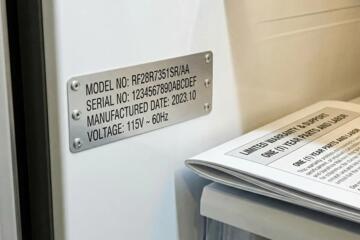
New appliances come with documents that affect safety, warranty coverage, and recall follow-up. Save the purchase receipt, the warranty terms, and the installation or delivery paperwork, because these documents often control who pays for repairs and what parts qualify. In the U.S., the Consumer Product Safety Commission (CPSC) posts recall notices, and many recalls require proof of purchase or model identification to confirm eligibility. Serial numbers and model numbers are usually printed on the rating plate, often inside a door frame or behind a panel, and those numbers must match the paperwork. Keep a folder with photos of the rating plate, too, because labels can fade after years of cleaning.
Save documents now.
Main Paperwork Pain Points
People often save only the receipt and then discover the warranty terms are different from what they assumed. Warranty coverage can exclude damage from improper installation, misuse, or unauthorized repairs, and the exclusion language lives in the warranty booklet or the manufacturer’s warranty page. Another common failure is losing the model and serial numbers, which blocks recall matching and slows down parts ordering. When the appliance is replaced under warranty, the service report may include the part numbers and diagnostic codes, which help if the issue returns.
Wrong documents cause delays.
Biological and health-related consequences show up indirectly through appliance performance. A refrigerator with a failed seal can increase temperature fluctuations, which can raise the risk of food spoilage and unsafe storage; the mechanism is simple: warmer compartments reduce the margin that slows bacterial growth. A dryer with restricted venting can increase lint accumulation and moisture, which can worsen indoor humidity and mold risk; the mechanism is airflow restriction plus heat, not a “mystery” problem. A dishwasher with a malfunctioning heater can leave higher residual moisture and detergent residue, which can affect cleaning quality and odor control.
What To Save And Why
Receipt With Item Details
Save the receipt that lists the exact appliance model or at least the SKU, purchase date, and seller name. This works because warranty claims and recall eligibility often require a purchase date and product identification, and retailers can dispute claims without a clear record. In practice, scan the receipt and store it with a photo of the rating plate, then label the file with the purchase date (for example, 2026-03-14_receipt.pdf). If you paid with a credit card, also keep the statement line item showing the transaction amount and merchant name, because it can back up the date.
Receipt first, always.
Warranty Terms And Coverage
Save the warranty booklet or a PDF of the warranty terms from the manufacturer’s site. This works because warranty coverage can split into parts and labor, and exclusions often reference installation requirements and authorized service. Look for the warranty start date rule; some warranties start at delivery, others at purchase, and the difference can be months. In practice, write the warranty expiration date on the folder tab using the date printed on the receipt, then add a note like “parts only after month 12” if the document states it.
Read the exclusions.
Model And Serial Number Proof
Save a photo of the rating plate showing model number, serial number, and electrical specs. This works because recalls and service parts ordering depend on exact identifiers, and the same model name can cover multiple revisions. In practice, take the photo in good light and include a second photo of the location so you can find it later; I keep mine in a “labels” subfolder inside the main appliance folder. If the label is hard to access, use a phone flashlight and avoid removing panels unless the manual permits it.
Labels fade over time.
Installation And Delivery Records
Save delivery tickets, installation checklists, and any paperwork showing whether the unit was installed by the retailer or a licensed installer. This works because many warranties treat “proper installation” as a condition, and the paperwork can show compliance with required clearances, venting, or water connections. In practice, keep the installer invoice and any test results, such as gas leak checks or venting verification notes, if they were recorded. If the installer used a specific part number for a hose or connector, those details can prevent repeat failures.
Paper prevents arguments.
Realistic Case Examples
Scenario 1: A household buys a new refrigerator in March 2026 and keeps only the receipt. After 14 months, the freezer temperature rises and food spoils; the service invoice shows a failed door seal. The family files a warranty claim but the retailer asks for the warranty terms and proof of delivery date; without the installation/delivery record, the claim takes longer because the start date is disputed. The family resolves it by using the credit card statement for the purchase date and a photo of the rating plate for model/serial verification, then attaches the service report to document the repair history.
Scenario 2: A family installs a new vented dryer and saves the manual but not the installation checklist. After a lint-related smell returns, a technician checks venting and finds a mismatch with the required duct type listed in the installation guide. The warranty claim is partially denied because the warranty excludes damage from improper installation, and the technician’s report references the missing checklist. The family avoids a repeat by saving the next installer invoice and adding a photo of the duct connection area, then they follow the manual’s cleaning schedule for the lint trap and vent run.
Document Checklist And Table
Use this decision support list to decide what to save and where to store it.
| Document | What It Covers | When You’ll Need It | How Long To Keep |
|---|---|---|---|
| Receipt / Proof of Purchase | Purchase date, seller, item identifiers | Warranty claims, disputes, recall matching | At least warranty period; keep longer if you can |
| Warranty Terms | Parts vs labor, exclusions, start date rule | Claims, eligibility checks | Until warranty expires; keep if you sell the home |
| Model/Serial Photos | Exact identifiers and specs | Recalls, parts ordering, service intake | As long as you own the appliance |
| Delivery/Installation Paperwork | Who installed, compliance notes | Claims involving installation requirements | At least warranty period |
| Manuals and Spec Sheets | Correct operation, cleaning, filter intervals | Maintenance, troubleshooting, service prep | As long as you own the appliance |
| Service Reports | Diagnostics, replaced parts, dates | Repeat issues, warranty extensions | Keep for the appliance’s life |
Keep one folder per appliance.
Step-by-step checklist:
- Scan the receipt and warranty terms the same day you receive the appliance.
- Take 2 photos of the rating plate and save them with the model/serial in the filename.
- File delivery and installation paperwork in the same folder, even if it feels redundant.
- Store manuals and spec sheets together, then add a note with the filter or maintenance schedule.
- After any service, add the work order and parts invoice to the folder.
Common Mistakes That Cost Time
Many households lose the warranty booklet and rely on a generic warranty page found later, which can mismatch the exact coverage terms for that model revision. Others throw away delivery tickets and then discover the warranty start date depends on delivery, not purchase. Some people save only screenshots of app registration and forget to record the appliance’s model and serial numbers, which blocks recall matching. A frequent frustration is storing documents in multiple places—email, cloud drive, and a drawer—so the right file takes 30 minutes to find during a service call.
One folder beats three apps.
Another mistake involves ignoring installation documentation for gas and vented appliances. If a technician later checks venting or connection type, the warranty may require proof that the installation matched the manual’s requirements. People also misfile service reports by date, not by appliance, which makes repeat-issue patterns hard to show. If you have a smart appliance, keep the email address used for the account; service intake sometimes asks for account identifiers, and “I changed phones” can become a paperwork problem.
FAQ
Which documents matter most?
Save the receipt, warranty terms, and a photo of the rating plate with model and serial numbers. These three documents drive warranty eligibility and recall matching in most service workflows.
How long should I keep appliance paperwork?
Keep proof of purchase and warranty terms for at least the warranty period. Keep manuals, model/serial photos, and service reports for as long as you own the appliance.
What if I can’t find the warranty booklet?
Download the warranty terms from the manufacturer using the exact model number and serial number, then save the PDF with the purchase date. If the warranty start date is disputed, the receipt and delivery record become the deciding documents.
Do I need installation paperwork for every appliance?
Installation paperwork matters most for gas appliances, vented dryers, and units with water connections. For simple plug-in appliances, the receipt and warranty terms usually carry more weight.
How do I handle recalls with paperwork?
Use the model and serial numbers from the rating plate to check recall eligibility, then save the recall notice page or PDF. If the recall requires proof of purchase, attach the receipt and any service history to your claim.
Author's Insight
Appliance paperwork looks boring until a warranty claim or recall forces you to prove dates and identifiers. The most reliable records are the ones that tie a specific model and serial number to a purchase date and a coverage rule. When households lose the rating plate photo, they often spend time searching for the label instead of describing the problem. I focus on building a single per-appliance folder with scans and photos, because service workflows reward fast, consistent documentation.
Paper reduces friction.
Key Takeaways
Save proof of purchase, warranty terms, and model/serial documentation, then keep delivery and installation records when installation affects coverage. Add manuals and spec sheets so you can follow the correct maintenance schedule and reduce repeat faults. Keep service reports and parts invoices to support repeat-issue troubleshooting and future claims. If food safety, indoor air quality, or gas/venting concerns arise, stop using the appliance and contact a qualified professional or the manufacturer’s service channel; for urgent hazards like gas odor, follow local emergency guidance.