Serial Numbers Vs Model Numbers
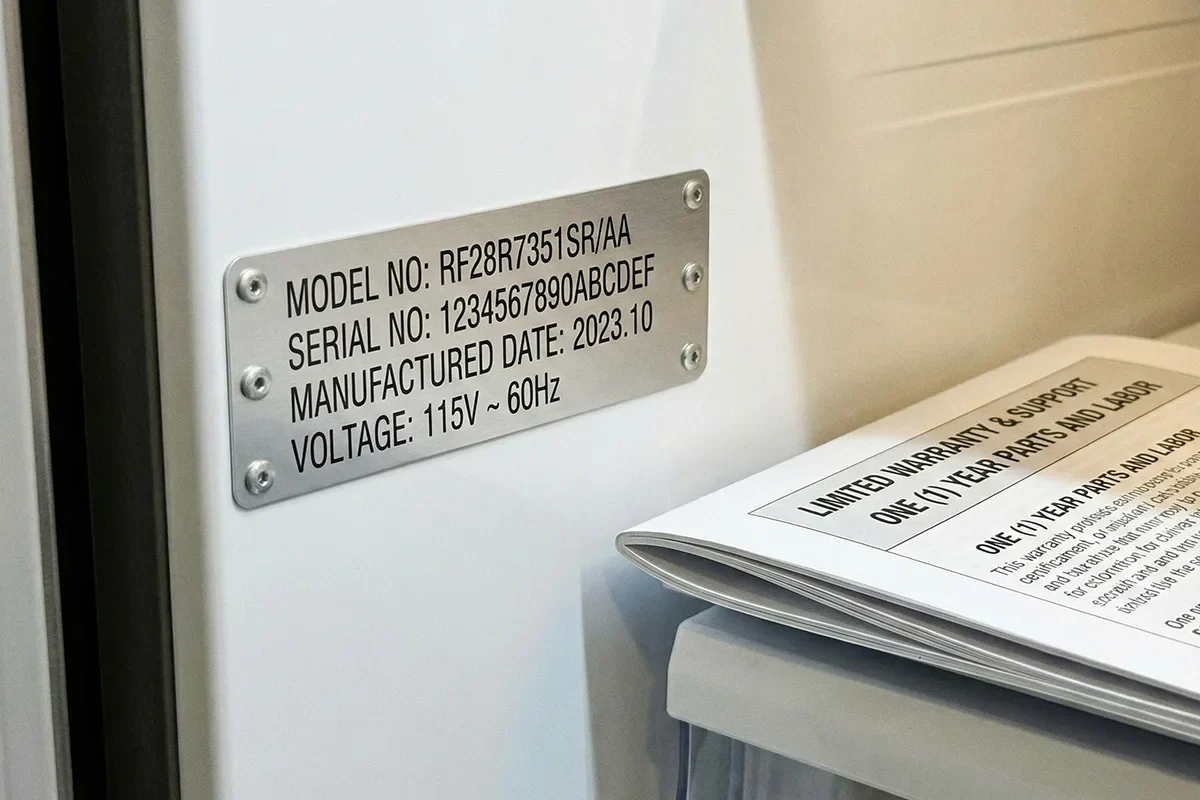
Serial numbers identify a specific unit built at a specific time, while model numbers identify a design or configuration family. On vehicles, that distinction matters because warranty coverage, recall targeting, and parts compatibility often hinge on the exact hardware installed, not just the general model line.
In practice, you’ll see serial numbers on labels attached to components, on stamped plates, or in vehicle software identifiers. Model numbers appear on documentation, brochures, and sometimes on parts catalogs as “model” or “part number” fields. A common example is a car’s infotainment unit: the model number may match a product family, while the serial number distinguishes the exact unit you have.
When you record data for admin tasks—service appointments, insurance documentation, warranty submissions, or parts orders—your goal is to capture the identifiers that downstream systems can match. If you record the wrong identifier, the request may bounce back for clarification, and the delay is usually on you, not the service desk.
What People Get Wrong
People often record a model number when the request form expects a serial number, then wonder why the claim or order cannot be matched. The mismatch happens because many forms use “serial number” language even when the underlying system can also accept a part number, and the staff member reviewing the ticket may follow the form strictly.
Another frequent error is copying identifiers from the wrong place on the vehicle. A door-jamb label might list a vehicle identification code or production details, while an engine or transmission label lists component serials. If you log only one label, you may miss the identifier that a recall notice or parts counter uses.
Some people also treat the VIN as a universal substitute. The VIN is a powerful key for vehicle-level records, but it does not always map cleanly to component-level serial numbers. For example, two vehicles with the same VIN prefix can still have different supplier revisions for a module, and those revisions can change part numbers and compatibility.
Supporting technologies add another layer. Many dealerships and parts systems use VIN decoding plus internal catalogs, while independent shops may rely on aftermarket catalogs that map part numbers to fitment. If your spreadsheet mixes “model” and “serial” fields without a note about where each value came from, you’ll lose the context that makes the data usable later.
What To Record And Why
Record Component Serial Numbers
For items that have individual labels—battery, alternator, infotainment head unit, telematics module, or safety-related modules—record the serial number exactly as printed, including hyphens and leading zeros. If a label is worn, photograph it in good light and write the value manually afterward; I’ve seen transcription errors happen when people zoom in on a blurry phone photo.
Use a consistent field name in your log, such as “Component Serial (as printed).” For outcomes, aim for zero ambiguity: when a parts counter asks for a serial, you should be able to answer in one line without searching. If you maintain a spreadsheet, keep a “Label Location” column (for example, “battery case label,” “under-dash module label,” or “service panel sticker”).
Record Model Numbers For Families
Model numbers help when you need to describe the design family, order compatible parts, or match documentation. Record the model number from the same source you’d cite in a service request: the owner’s manual index, the module label that lists a model or part family, or the invoice line item from a prior repair.
When you log a model number, also record the context that narrows the family: trim level, engine type, transmission type, and build date if available. A mild frustration: many “model number” fields in catalogs are really part numbers, and the wording varies by supplier, so you’ll want to capture the label source to avoid later confusion.
Use VIN For Vehicle-Level Matching
Record the VIN once and treat it as the vehicle-level key for recalls, warranty eligibility checks, and many service workflows. If you’re creating a maintenance record, store the VIN alongside the purchase date and current mileage. In my notes from a 2024 spreadsheet template I reviewed, the VIN column was the only one that stayed stable across years, which made it the anchor for everything else.
VIN decoding does not always reveal component serials, so you still record component serials when you can. If you’re ordering parts, VIN helps filter fitment, but the parts system may still ask for a part number or serial for certain modules.
Choose A Logging Method That Survives
Pick a method you can search later. A simple approach is a two-tab spreadsheet: “Vehicle” (VIN, trim, build date, key dates) and “Components” (serial, model/part family, label location, install date, invoice reference). If you use a password manager or secure notes app, store photos of labels there too; phone galleries get messy, and a label photo without a date becomes hard to interpret.
For realistic outcomes, plan to spend 10–20 minutes per vehicle for an initial setup if labels are accessible. After that, updates should take 2–5 minutes per new repair entry. If you find yourself spending longer than that, the structure likely needs a field rename or a better source-of-truth rule.
Educational Case Examples
Example 1: Warranty claim for a module replacement. A driver logs the infotainment “model” number from the owner’s manual but submits a warranty request form that asks for the module serial number. The dealership replies that the serial does not match the installed unit. The driver then checks the label on the back of the head unit, records the serial exactly as printed, and resubmits with the correct identifier and the original invoice number.
Example 2: Parts order after a recall-related repair. An owner records the battery model family from the receipt but not the battery serial printed on the battery casing. The parts counter can confirm the battery type from the VIN, yet the replacement kit depends on the battery revision. After the owner provides the battery serial, the counter selects the correct revision and the order ships without a second verification call.
Comparison Checklist
| Record Type | Where It Shows Up | Best Use | Common Failure Mode |
|---|---|---|---|
| Serial Number | Component label, stamped plate, module sticker | Warranty matching, recall targeting, exact unit replacement | Using a model/part family value where a serial is required |
| Model Number | Documentation, module label, parts catalog family | Describing configuration, ordering compatible families | Mixing it with part numbers without noting the source |
| VIN | Dash plate, door-jamb label, registration documents | Vehicle-level records, recall eligibility checks, fitment filtering | Assuming VIN reveals component serials for every module |
Step-by-step checklist for a reliable log: (1) record VIN once, (2) add trim/engine/transmission, (3) for each replaced component, capture serial and model/part family from the label or invoice, (4) store label location and install date, (5) keep invoice reference numbers so you can trace the source if a value is questioned.
Common Mistakes
One mistake is logging values from memory. Serial numbers often include characters that look similar—O vs 0, I vs 1, or missing hyphens—so manual recollection causes avoidable mismatches. If you cannot read the label clearly, take a photo and transcribe later when you can zoom in.
Another mistake is mixing “model number” with “part number” in the same column. Some labels label a part family as a model number, while invoices list a part number, and the two systems do not always align. Use separate columns and record the label wording verbatim when possible.
People also forget to record the source location. A serial number without “where it came from” becomes hard to verify later, especially when multiple similar modules exist in the cabin or under the hood. A small habit—adding “label location” notes—saves time during follow-up calls.
Finally, avoid storing sensitive identifiers in unprotected places. VIN and component serials can be used for fraud attempts in some contexts, so keep them in a secure spreadsheet or password-protected storage, and share only what a service provider requests.
FAQ
Should I record both serial and model numbers?
Record both when you can. Serial numbers help match the exact unit for warranty and recall workflows, while model numbers help describe the design family for documentation and compatible parts ordering.
Where do I find a component serial number on a car?
Look for labels on the component itself, such as battery casing labels, module stickers under trim, or stamped plates on certain assemblies. If labels are inaccessible, the invoice line item from the replacement part may list the serial.
Can VIN replace serial numbers for recalls?
VIN often drives vehicle-level recall eligibility, but it does not always identify component-level serials. Some recall repairs depend on installed revisions, so serial or part identifiers may still be requested.
What if the label is damaged or unreadable?
Use a clear photo taken in good light and transcribe carefully, or request the identifier from the service invoice if the part was replaced. If neither is available, ask the shop what identifier their system requires for ordering.
How should I store these numbers safely?
Use password-protected storage for spreadsheets and photos, and share only the identifiers a service provider requests. Keep a note of where each value came from so you can verify it later without exposing extra data.
Author's Insight
Serial numbers and model numbers map to different matching rules in vehicle administration. Serial numbers tend to identify a specific installed unit, while model numbers describe a family or configuration used for compatibility and documentation. VIN acts as a vehicle-level key that many systems can decode, yet it does not reliably replace component serials for every module.
For recordkeeping, the most reliable approach is to log identifiers with their source location and date, then keep invoice references for cross-checking. If you treat the label wording as data, you reduce the chance that “model” and “part number” get mixed in later service calls.
Key Takeaways
- Record serial numbers for components that have individual labels, especially for warranty and recall-related workflows.
- Record model numbers as family descriptors, but separate them from part numbers and note the source wording.
- Use VIN as the vehicle-level anchor, while recognizing it does not always reveal component serials.
- Store identifiers with label location, dates, and invoice references to prevent future mismatches.