Serial Numbers And Receipts
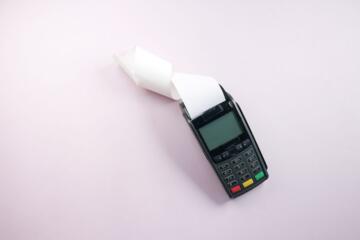
A serial number is a unique identifier assigned to a physical unit by the manufacturer. A receipt is the transaction record that shows who bought the item, when it was sold, and what was sold. Matching the two matters because warranties, returns, and fraud investigations often hinge on a specific unit rather than a generic model name.
In practice, you usually match a serial number from the product label to a serial number field on the receipt, or to a serial number you recorded at purchase time. Some receipts include a serial number line; many do not. When the receipt lacks it, you can still build a reliable link by recording the serial number yourself and storing it with the receipt image or PDF.
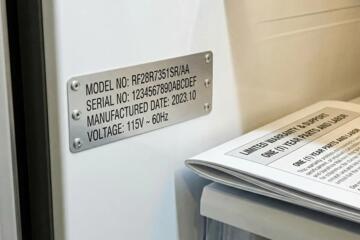
For example, a laptop may show its serial number on the bottom case and in the system firmware. A home appliance may show it on a sticker inside a door or behind a panel. A phone may show it in the settings menu and on the SIM tray label. The matching system is only as strong as the consistency of those identifiers and your record-keeping.
Where Matching Breaks
People often assume that a receipt automatically contains enough detail to identify the exact unit. Many retailers print only the model, color, and quantity, which helps with returns but not always with warranty coverage for a particular device. If you later need to prove the unit you own, you may discover that the receipt lacks the serial number and the warranty portal asks for it anyway.
Another failure point is mixing identifiers. Some products have multiple numbers: serial number, model number, part number, IMEI/MEID for cellular devices, and sometimes a manufacturing batch code. A receipt might list one of these, while the product label shows another. If you record the wrong one, the match fails even when you did everything “right.”
Supporting technologies also affect what you can match. Retail systems may store serial numbers in a back-end inventory database even when the printed receipt omits them. Manufacturers may run warranty systems that accept serial numbers but require proof of purchase date. Shipping and refurbishing workflows can also change labels, and a refurbished unit may carry a different serial number than the one you expect from the listing.
There’s also a practical dependency on how you store records. A photo of a label taken months later can be unreadable, and a receipt email forwarded through multiple inboxes can lose attachments. I’ve seen cases where a receipt PDF was named “Receipt.pdf” and overwritten during a phone backup—annoying, and it turns a simple lookup into a scavenger hunt.
How To Match Reliably
Record Serial Numbers Early
Write down the serial number at purchase time and store it with the receipt. If the receipt already includes a serial number line, copy it exactly as printed, including hyphens and spacing. If it does not, take a clear photo of the label and save it alongside the receipt file. A quick method is to create a folder per purchase date and retailer, then name files like “2026-08-19_Retailer_Product_SerialXXXX.pdf.”
For devices with multiple locations, pick one source of truth and stick to it. On a laptop, the label on the chassis and the serial shown in system information should match, but they can differ if a part was replaced. On a phone, the serial shown in settings may differ from the IMEI printed on the tray; warranty systems typically ask for the serial number, not the IMEI. If you’re unsure, check the manufacturer’s warranty page instructions before you record anything.
Use Receipt Metadata And Dates
When the receipt lacks a serial number, you can still match by combining purchase date, retailer, and product identifiers. Many warranty portals accept serial number plus purchase date, and they may cross-check the retailer name or order number. Keep the order number from the confirmation email, even if the receipt is missing details. Some portals accept an order number even when the receipt is incomplete, but the exact behavior varies by brand and region.
If you paid by credit card, the statement line can also help. The statement usually shows merchant name, transaction date, and last four digits of the card, which can support “proof of purchase” when the receipt is lost. In a dispute, you may need to show that the purchase date aligns with the warranty start date. That alignment is often more persuasive than a vague memory of when you bought the item.
Verify With Manufacturer Portals
Use the manufacturer’s warranty or support portal to confirm what identifier it expects. Some portals accept serial numbers only; others accept serial plus proof of purchase. If the portal rejects your serial number, do not guess. Re-check the label for transcription errors, confirm you copied the correct identifier, and verify that the serial number format matches the label exactly.
As a practical aside, I’ve noticed that some portals are sensitive to leading zeros and hyphen placement. A serial number like “00123-AB” can fail if you enter “123AB” from memory. If you’re entering the serial number manually, zoom in on the label photo and transcribe character-by-character.
Store Records With Versioned Backups
Receipts and label photos are documents, so treat them like documents. Use a single storage location with version history if possible, such as a cloud drive with file history or a backup tool that keeps older versions. A versioned backup matters when you later discover that the receipt scan is blurry or the serial number photo is cut off.
For example, if you scan a receipt using a phone app, save the original scan file and also export a PDF. I once used an app version labeled “v3.2” that produced a slightly compressed PDF; the compression made small text harder to read. Keeping the original reduces that risk when you need to zoom in months later.
Case Examples For Real Life
Appliance With No Serial On Receipt
A buyer purchases a countertop microwave from a big-box retailer. The printed receipt lists the model name, price, and store location, but no serial number. The buyer photographs the serial label inside the door frame on the installation day and saves it as “2026-01-14_Microwave_Serial_XXXX.pdf” with the receipt image. Two months later, the buyer files a warranty claim and enters the serial number into the manufacturer portal along with the purchase date from the receipt. The claim proceeds because the portal accepts serial number plus proof of purchase date, even though the receipt did not list the serial number.
The lesson is not that every warranty system behaves the same way. The lesson is that a self-recorded serial number can compensate for a receipt that omits it, as long as the serial number is accurate and legible.
Phone Receipt With Order Number Only
A buyer buys a smartphone online. The receipt email includes an order number and device model, but the printed receipt attachment omits the device serial number. The buyer later checks the phone’s settings and records the serial number shown in the device information screen. When support requests proof of purchase, the buyer uploads the receipt attachment and provides the serial number. The support team uses the order number and purchase date to validate the transaction, then uses the serial number to confirm the unit’s warranty status.
This scenario works because the order number ties the transaction to the device purchase, while the serial number ties the warranty to the specific unit. If either piece is missing, the match becomes harder and may require additional verification.
Matching Checklist And Tradeoffs
| Situation | What You Have | Best Matching Method | What Can Still Fail |
|---|---|---|---|
| Receipt includes serial | Serial number printed | Copy exactly; store receipt + label photo | Transcription errors; label changed after repair |
| Receipt omits serial | Receipt + order date | Record serial yourself; match via portal date checks | Unreadable label photo; wrong identifier recorded |
| Receipt lost | Card statement + email order | Use order number and statement date; request duplicate receipt | Merchant name mismatch; statement date differs from receipt date |
| Refurbished or repaired | Old receipt; new label | Use the serial number on the current unit; keep service paperwork | Warranty tied to original unit; label replaced |
If you want a step-by-step checklist, use this sequence and stop when you reach a stable match:
- Find the serial number on the unit label and confirm it matches the format you expect (hyphens, leading zeros).
- Locate the receipt or order confirmation and record purchase date, retailer name, and order number.
- Check whether the receipt includes a serial number line; if it does, compare it to the label.
- Save a legible photo of the label and store it with the receipt file.
- Test the match by entering the serial number into the manufacturer warranty portal, using the receipt date when requested.
- If the portal rejects the serial number, re-check transcription and identifier type before contacting support.
Common Mistakes That Cost Time
One recurring mistake is recording the model number instead of the serial number. Model numbers identify a product family; serial numbers identify a unit. Warranty systems often reject model numbers when they ask for serial numbers, and returns desks may treat them as insufficient proof for a specific unit.
Another mistake is relying on a blurry label photo. If the serial number is partially obscured, you may not notice until a warranty claim requires exact characters. A quick fix is to zoom in on the photo before you save it and confirm every character is readable. That takes seconds and prevents hours of follow-up.
People also mix up multiple receipts for the same item. A subscription add-on, an extended warranty purchase, or a replacement part can generate separate receipts. If you attach the wrong receipt to a claim, the portal may show a mismatch in purchase date or retailer. Keeping a folder per item reduces this confusion.
Finally, some buyers assume that a retailer can always look up the serial number from their transaction. Retailers may have the data, but access depends on internal systems, staff training, and local policy. If you need the serial number later, your own record is the most consistent starting point.
FAQ
Do receipts always list serial numbers?
No. Many receipts list model, quantity, and price but omit the serial number. If the receipt omits it, record the serial number from the unit label and store it with the receipt.
Where can I find the serial number on common devices?
It depends on the product. Laptops often show it on the chassis label and in system information. Phones often show it in device settings and sometimes on the SIM tray or packaging. Appliances often place it inside a door or behind a panel.
What if my serial number photo is unreadable later?
Re-take the photo while the label is still accessible, then replace the stored file. If the label is no longer reachable, contact the manufacturer or service provider and ask what proof they accept.
Can I use the order number instead of a serial number?
Sometimes. Retail order numbers can help validate the purchase date and transaction, but warranty status usually requires the serial number for the specific unit. Use the manufacturer portal instructions to confirm what it accepts.
Why does a warranty portal reject my serial number?
Common causes include transcription errors, entering the wrong identifier type (model vs serial), or using a serial number from a replaced part. Verify the label format and compare it to the portal’s expected input.
Author's Insight
Serial numbers and receipts solve different parts of the same problem: receipts prove a transaction, while serial numbers identify a specific unit. Matching works best when you treat the serial number as a character-accurate identifier and store it with the purchase record. Warranty portals often cross-check purchase date and retailer information, so missing date fields can block claims even when the serial number is correct. If a receipt omits serial numbers, self-recording the serial number at purchase time creates a durable link that many support workflows can use.
Key Takeaways
- Receipt details vary; serial numbers often do not appear on printed receipts.
- Record the unit serial number from the label and store it with the receipt and order number.
- Use the manufacturer portal to confirm what identifier it expects and how it validates purchase date.
- Avoid mixing model numbers, part numbers, and serial numbers; transcription errors are a frequent cause of failure.
- Keep legible, versioned backups of receipts and label photos so you can recover evidence later.