Major Purchases Paperwork
Major purchases generate a paper trail that shows what you bought, what you paid, and what promises were made. That trail matters when a warranty claim fails, an insurer asks for proof, a tax form needs backup, or a dispute turns into a request for documentation. A car sale, a financed appliance, a home improvement contract, and a long-term service plan all produce different documents, but the logic stays the same: keep the records that prove the transaction and the terms.
Start by separating documents into three buckets: proof of payment, proof of terms, and proof of identity. Proof of payment includes receipts, bank statements, and payment confirmations. Proof of terms includes contracts, warranty booklets, service agreements, and any addenda. Proof of identity includes names, addresses, account numbers, and policy or contract identifiers. If you keep only one bucket, you usually lose the ability to answer the question that comes later.
What People Get Wrong
People often keep the wrong documents because they focus on what feels official rather than what proves a specific claim. A purchase receipt without the contract can fail to show warranty exclusions. A warranty booklet without the proof of purchase can fail to establish eligibility. A bank statement without the invoice can fail to show what the payment covered.
Another common mistake is assuming that digital records will remain accessible. Companies change portals, emails get filtered, and accounts get closed after a dispute. Even when a company offers a download button, the file might not include the terms that were active at purchase time. Supporting technologies matter here: payment processors store transaction IDs, insurers store claim numbers, and warranty administrators store coverage records keyed to VINs, serial numbers, or customer IDs.
Retention also gets misunderstood. Many people keep everything for years, then can’t find the one document needed for a claim. Others throw away documents too early, then discover that a tax audit or a warranty dispute requests records from a prior year. The practical fix is to keep fewer documents, but keep the right ones for the right duration.
Solutions And Advice
Use A Retention Timeline
Create a simple timeline tied to the purpose of the document. For example, keep proof of payment for at least the length of the tax filing cycle plus any reasonable follow-up window. Keep contracts and warranty terms for the warranty period plus a buffer for claims processing. Keep insurance-related documents for the claim’s life and the statute-of-limitations window that applies to disputes in your jurisdiction.
In the U.S., tax-related records often need to be kept for multiple years after filing, and the exact period depends on the situation. If you want a conservative approach, keep tax-supporting records for at least 3–7 years, but confirm the period for your case with IRS guidance or a tax professional. For warranty disputes, the warranty term itself is the baseline; if the warranty is tied to a product’s life, keep the contract and proof of purchase until the coverage ends.
For a practical tool, use a spreadsheet with columns for “document type,” “start date,” “end date,” and “where stored.” I’ve used Google Sheets version history (I last checked it on 2024-11-03) to recover older edits after a mistaken deletion, which is a reminder that organization systems also need backups.
Organize By Claim Type
Organize documents around the reason you might need them later: warranty claim, insurance claim, tax support, or legal dispute. Each claim type has different evidence requirements. A warranty claim usually needs proof of purchase plus the warranty terms and the product identifier (VIN, serial number, or model). An insurance claim usually needs the policy number, the claim number, the itemized loss details, and communications.
Use a consistent naming convention so you can find files fast. Example: “2026-08-08_Warranty_ToyotaVIN1234_Receipt.pdf” or “2026-08-08_Contract_HomeRenovation_Invoice.pdf.” If you store scans, keep the original PDF when possible rather than re-saving as images; text-based PDFs are easier to search later.
If you use a cloud drive, turn on versioning and keep an offline backup for the documents you would struggle to recreate. Cloud storage is convenient, but it’s not a substitute for having a local copy when a portal locks you out during a dispute.
Verify Identifiers And Coverage
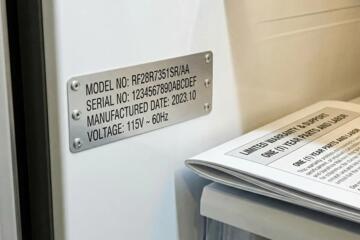
Before you file documents, verify that the identifiers match the purchase. For a vehicle, confirm the VIN on the purchase agreement matches the VIN on the registration and any warranty enrollment. For appliances, confirm the serial number on the invoice matches the serial number on the unit label. For service contracts, confirm the coverage start date and the service address.
Coverage terms often hide in addenda. Read the section that lists exclusions, transferability, and claim procedures. Many warranties require a specific process, such as contacting a warranty administrator within a time window or using designated service providers. If you skip this step, you can end up with a claim that fails on procedure rather than on the underlying problem.
When you scan, capture the pages that list coverage limits and the pages that show the product identifier. I’ve seen people scan only the signature page, then later discover the coverage details were on the next two pages—an avoidable frustration.
Case Examples
Car Purchase With Warranty Claim
An anonymized buyer finances a used car and receives a purchase agreement, a warranty booklet, and a separate warranty enrollment confirmation. Months later, a covered component fails. The buyer files a claim using the VIN, proof of purchase, and the warranty terms page that lists coverage limits. The claim succeeds because the documents match the VIN and the coverage start date; the service center also had the buyer’s payment confirmation for the down payment.
In the same scenario, a different buyer keeps only the receipt and the warranty booklet but not the enrollment confirmation. The warranty administrator later disputes the coverage start date. The buyer then has to request records from the lender and the dealer, which delays the claim. The difference is not the failure of the warranty; it’s the missing proof of terms.
Home Improvement Contract Dispute
An anonymized homeowner signs a home improvement contract with a payment schedule and a written scope of work. After a delay, the homeowner needs to document what was agreed and what was delivered. The homeowner keeps the signed contract, the change order documents, and the invoices tied to each payment milestone. When the contractor disputes the final payment, the homeowner can show the scope and the acceptance criteria in the contract.
Another homeowner keeps only the invoices and throws away the contract after the project ends. The contractor later claims that a change order was verbal. Without the written scope, the homeowner’s evidence becomes weaker, and the dispute resolution process takes longer. The lesson is that payment proof alone rarely resolves term disputes.
Checklist For Decision Support
| Purchase Type | Keep Proof Of Payment | Keep Proof Of Terms | Keep Identifiers |
|---|---|---|---|
| Vehicle | Receipt, loan payoff statement, payment confirmations | Purchase agreement, warranty booklet, warranty enrollment | VIN, mileage at purchase, registration details |
| Home Improvement | Invoices, payment schedule records, bank confirmations | Signed contract, scope of work, change orders | Address, permit numbers (if any), contractor license ID |
| Long-Term Service Plan | Plan invoice, payment receipts | Service agreement, coverage limits, claim procedure | Account number, plan ID, service address |
Step-by-step checklist you can use right after purchase:
- Save the final signed contract or agreement PDF and the receipt/invoice PDF.
- Capture the page that lists coverage limits and exclusions, plus any addenda.
- Confirm identifiers match the item: VIN/serial number/account ID.
- Record the purchase date and the coverage start date in a notes file.
- Store communications that include reference numbers, denial reasons, or acceptance criteria.
- Set a retention end date based on warranty term, tax cycle, or claim dispute window.
- Back up the folder locally and in your cloud drive with versioning.
Common Mistakes
People often scan only the front page of a contract and then assume the rest is “standard.” Many agreements include coverage limits, arbitration clauses, and claim procedures on later pages. If you keep only the signature page, you lose the terms that matter most during a dispute.
Another mistake is mixing documents from multiple purchases into one folder. That makes search harder and increases the chance of using the wrong warranty terms or the wrong invoice. A folder per purchase, with a consistent naming convention, reduces that risk.
Some consumers rely on screenshots from portals. Screenshots can omit key details like reference numbers, dates, or coverage start times. A PDF download or a saved email attachment is usually more reliable.
Finally, people forget to keep the “why.” When a claim is denied, the denial letter explains the reason code. Without that document, you can’t tell whether the issue was eligibility, procedure, timing, or documentation.
FAQ
How Long Should I Keep Receipts?
Keep receipts and payment confirmations for at least the period needed for taxes and any foreseeable warranty or dispute. For tax support, the retention window depends on your situation; for warranty disputes, keep until the warranty ends plus time for claims processing.
Do I Need To Keep Warranty Booklets?
Yes, when the warranty terms include exclusions, claim procedures, or coverage limits. Keep the booklet or agreement pages that list those terms, plus proof of purchase that ties you to the coverage.
What If I Lose The Contract?
Request a copy from the seller or service provider using the purchase date and account number. If you can’t recover the exact version, keep any emails or portal records that show the terms you were shown at purchase time.
Should I Save Emails For Claims?
Save emails or letters that include reference numbers, denial reasons, and promised next steps. A timeline with dates often matters more than a general customer service summary.
Is A Bank Statement Enough Proof?
Bank statements prove payment occurred, but they usually do not prove what you bought or the terms of coverage. Pair payment proof with the invoice/receipt and the contract or warranty terms.
Author's Insight
Good recordkeeping for major purchases follows a simple evidence logic: later claims require proof of payment, proof of terms, and proof of identifiers. Many consumers keep receipts but discard the contract pages that contain exclusions and procedures, which weakens warranty and dispute outcomes. A practical system uses folder-per-purchase organization, consistent file naming, and a retention timeline tied to warranty duration and tax needs.
Because laws and retention periods vary by country and situation, readers should confirm tax record retention rules with official guidance or a qualified professional. For disputes, the most reliable documents are the signed agreement, the invoice, and the written denial or reference-number communications.
Key Takeaways
- Keep documents that prove payment, prove terms, and prove identifiers; receipts alone rarely solve term disputes.
- Organize by purchase and by claim type so you can find the right evidence during a warranty, insurance, or legal issue.
- Verify VIN/serial numbers, coverage start dates, and account IDs before filing.
- Save the written timeline: contracts, change orders, denial letters, and messages with reference numbers.
- Use a retention timeline tied to warranty duration and tax needs, then back up the folder locally and in the cloud with versioning.