Digital Accounts After Death
After a family member passes, online accounts often become both a privacy issue and an administrative burden. Email, cloud storage, banking portals, and subscription services may contain documents needed for estates, taxes, and benefit claims. At the same time, those accounts can expose personal data to anyone who gains access through stolen credentials or social engineering.
Start with a practical inventory rather than a single “login everything” attempt. Many families begin with the accounts that affect money and records first: email accounts, password managers, mobile phone service, and any financial websites. Then they move to cloud drives, messaging apps, and device backups. If the person used a password manager, the recovery path often determines how quickly you can proceed; if they did not, you may need to rely on provider-specific account recovery processes that can take days or weeks.
Main Problems And Pain Points
Families often get stuck because they assume “account access” means the same thing across providers. Some services treat estate access as a legal request that requires documentation; others allow limited data export; many restrict full account control until identity and authority are verified. That mismatch creates delays, especially for accounts protected by two-factor authentication (2FA).
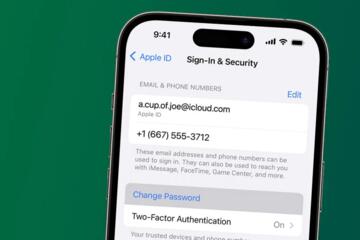
Another common error involves passwords and recovery codes. People frequently try old passwords from a notebook, then trigger security locks after multiple failed attempts. Many providers treat repeated failures as suspicious activity, which can lead to temporary account suspension. If the deceased used an authenticator app for 2FA, you may need access to the device or recovery codes; SMS-based 2FA can be harder if the phone number is still active under the deceased’s name.
Dependencies matter because accounts connect to each other. A password manager can store credentials for dozens of sites, but it also depends on a master password and sometimes a recovery email. Email accounts depend on phone numbers and recovery emails, which depend on carrier records. Cloud storage depends on the same identity used for email, and messaging apps often require device-level access. When one link breaks, the rest of the chain slows down.
There is also a privacy and legal risk. Email and cloud storage can contain sensitive health information, financial records, and communications with third parties who never consented to disclosure. In many jurisdictions, estate representatives can access certain records, but the scope and timing vary. If you are not sure about your authority, you may need to pause and ask the estate attorney how to handle specific categories of data.
Solutions And Advice
Build An Account Inventory
Write down every known login identity: email addresses, usernames, and any linked phone numbers. Include the device context too, such as “iPhone with iCloud backup” or “laptop with browser profiles.” A simple spreadsheet works, but a paper list can help when you lose access to the deceased’s computer. If you have access to a password manager vault, record the service name and the last successful login date you can verify.
For a time anchor, many families start within 24–72 hours to capture time-sensitive notices and to prevent account lockouts. If you are dealing with a court process, keep the inventory versioned and dated; a “v1” list made on 2026-08-01 can later help you show what you knew and when. This also reduces duplicate requests to providers.
Handle Passwords And 2FA
Use a controlled approach for credentials. If you have a password manager, prioritize recovering the master access rather than trying to guess passwords across sites. If you do not have the master password, focus on provider recovery channels that match the deceased’s identity records, such as legal request forms.
For 2FA, check whether the person used SMS, authenticator apps, or hardware keys. Authenticator apps often require the original phone or recovery codes; hardware keys require the physical key. If you attempt multiple logins, stop after a small number of failures because lockouts can extend the timeline. I have seen families lose a week to repeated “reset password” attempts that triggered additional verification steps, which, frankly, most people skip when they plan.
When you contact providers, gather documentation first: proof of death, your legal authority (executor/administrator/guardian), and any court paperwork required by that provider. Some providers accept a death certificate plus a letter of authorization; others require a court order. The exact list varies by company and country.
Request Data Through Providers
Many major services offer a “memorialization” or “account inactive” process, and some offer a legal request workflow for estate access. Start with the provider’s official support pages for deceased users rather than third-party “account recovery” services. Those third parties often ask for sensitive documents and can create additional privacy exposure.
When you submit requests, include a clear scope statement. For example: “access to account data needed for estate administration” rather than “give us everything.” If you need specific items like stored photos, tax documents, or email archives, list the categories. Providers may respond with partial exports or require additional steps for full access.
Keep a log of every ticket: date submitted, ticket number, and the response summary. A short note like “Google request submitted 2026-08-03, waiting for verification” helps you coordinate with an attorney and prevents repeated submissions.
Case Examples
Example: Email And Cloud Drive
A family member died with an active Gmail account and an iCloud backup. The executor had the deceased’s laptop but not the phone used for SMS-based 2FA. The executor created an inventory of the email address, the iCloud Apple ID, and the carrier account. They then submitted provider requests with a death certificate and proof of authority, and they waited for verification before attempting any password resets. The provider returned a limited data export for specific categories, which the executor used to locate tax documents stored in cloud folders.
The key lesson in this scenario was sequencing: the family avoided repeated login attempts that triggered additional verification, and they documented each request date to coordinate with tax filing deadlines.
Example: Banking Portal Access
A spouse managed bill payments through a bank website and a separate password manager. After the death, the spouse could not access the bank portal because the bank required 2FA tied to the deceased’s phone number. The spouse contacted the bank’s support line and requested guidance for estate access, providing proof of death and legal authority. The bank directed them to a specific form for account administration and offered a process for transferring access to the estate. During the waiting period, the spouse used mailed statements and existing autopay records to avoid missed payments.
This case shows how “digital banking access” often depends on identity verification and phone-number control, not just knowing the password.
Comparison Table And Checklist
| Account Type | Typical Access Path | Common Blockers | What To Prepare |
|---|---|---|---|
| Provider legal request or recovery flow | 2FA device loss, recovery email/phone mismatch | Death certificate, authority documents, list of linked addresses | |
| Cloud Storage | Linked to identity used for email | Same 2FA dependencies, shared links | Scope of needed files, request log |
| Banking Portals | Estate administration process | Phone-number 2FA, account ownership rules | Court/authority paperwork, payment continuity plan |
| Messaging Apps | Device-based access or provider policy | No web login, end-to-end encryption constraints | Device access status, legal request documentation |
Step-by-step checklist you can follow without guessing:
- List every email address and username tied to the deceased, plus any known recovery phone numbers.
- Record which device holds 2FA (phone, authenticator app, hardware key) and whether you have that device.
- Gather proof of death and your legal authority documents before contacting providers.
- Start with email and banking-related accounts because they control password resets and notices.
- Submit provider requests using official forms, then log ticket numbers and dates.
- Download only what you need for estate administration, then encrypt and restrict access to the files.
- Stop repeated login attempts after a small number of failures to avoid lockouts.
Common Mistakes
One frequent mistake is treating “password reset” as a universal solution. Many providers require access to the recovery phone or recovery email, and they may block resets when the account appears to be under investigation. Another mistake involves using third-party “account recovery” services that request sensitive documents; those services can increase exposure and may not have a legitimate path to access.
Families also over-collect data. Downloading entire inboxes, full cloud drives, and message histories can create a privacy problem and a storage problem. A narrower scope reduces both risk and time spent sorting. If you need documents for filings, extract those documents and keep a minimal archive of the rest.
Another error is skipping documentation. Without a dated log of what you requested and when, you can lose track of which provider already received your legal request. That confusion can lead to duplicate submissions and longer delays, especially when providers ask for the same proof again.
Finally, some people assume they can access everything immediately because they are family. Estate access rules vary by jurisdiction and by provider policy, and some providers require a court order for certain data types. If you are uncertain about your authority, pause and ask an attorney before you proceed with broad access.
FAQ
What documents do providers ask for?
Most providers request proof of death and proof of your authority to act for the estate, such as executor/administrator paperwork. Some also require a court order depending on the service and the scope of access requested.
How do I handle 2FA when I do not have the phone?
Check for authenticator recovery codes or a hardware key. If you lack the 2FA device, use the provider’s legal request process and avoid repeated login attempts that trigger additional verification or lockouts.
Can I access a deceased person’s email for estate matters?
Access depends on provider policy and your legal authority. Many services offer limited data access or memorialization, while full access often requires a formal request and verification.
What should I do with password manager accounts?
Prioritize recovering the master access if you have it. If you do not, treat the vault like any other protected account and follow the provider’s recovery or legal request process rather than guessing passwords.
How do I protect privacy when downloading account data?
Download only documents needed for estate administration, encrypt stored files, and restrict access to people who need it. Keep a record of what you accessed and why, since email and cloud data can include third-party information.
Author's Insight
Digital account access after a death sits at the intersection of provider policy, identity verification, and privacy law. The practical bottleneck usually comes from 2FA and from the fact that providers treat “estate access” as a formal process rather than a simple password change. A careful inventory, a dated request log, and a narrow scope for data downloads reduce delays and privacy exposure. When legal authority is unclear, estate counsel guidance prevents accidental overreach. I cannot provide personal clinical experience, but the workflow above matches how major providers typically handle deceased-user requests and identity checks.
Key Takeaways
- Start with an inventory of email addresses, linked recovery numbers, and devices holding 2FA.
- Use official provider legal request paths and keep a dated log of submissions and responses.
- Limit downloads to estate-relevant documents, then encrypt and restrict access to the files.
- Avoid repeated login attempts that trigger lockouts; plan for verification delays.
- If your authority is uncertain, pause broad access and ask an estate attorney how to proceed.